Five 4K60 Streams Were Fine. The Sixth Was Not.
A transcoder can finish a ten-second clip in five seconds and call itself fast. A live camera is less impressed. It sends the next frame anyway.
At 60 FPS, a frame arrives every 16.667 milliseconds. If decode, processing, encode, and queue delay take longer, the pipeline starts borrowing time from the next frame. A small deficit becomes an expanding backlog. Eventually the system must add latency, drop frames, or reduce the work.
That is the failure mode behind multi-camera analytics, live overlays, remote production, video conferencing, security recorders, streaming gateways, and vision systems that pre-process frames before inference. Their useful capacity is not the largest offline FPS number. It is the number of feeds that stay inside the service-level agreement.
I built a paced H.264 decode, CUDA processing, and hardware encode pipeline on the RTX PRO 4000 Blackwell SFF. One, two, four, and five concurrent 4K60 streams met the deadline in all three confirmation runs. Six did not. The completed-frame rate flattened around 333 FPS whether I requested 360 or 480.
The placement control was just as useful. A 4K luma plane could make a round trip through host memory and still sustain 60 FPS, although p99 latency rose from about one millisecond to 5.4. Add a NumPy pointwise operation and the path dropped to 49.9 FPS. Add a CPU unsharp filter and it fell to 36.1.
The GPU did not merely make the effect faster. Keeping the frame on the GPU preserved the deadline.
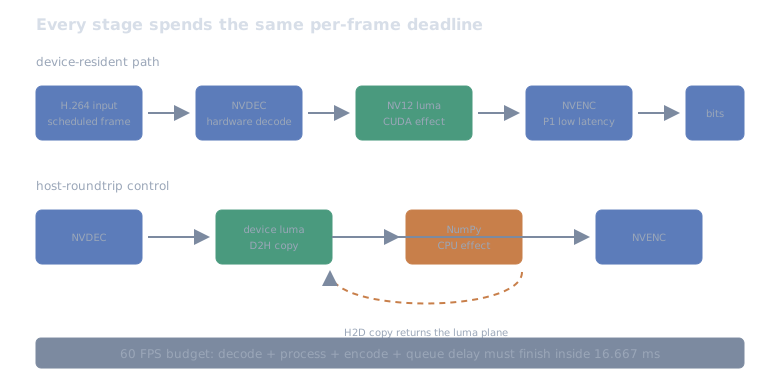
Decode, processing, encode, and queue delay all spend the same 16.667 ms budget. A host transfer is not outside the SLA just because it is outside the kernel.
The pipeline had its own clock
Each worker read a deterministic ten-second H.264 testsrc2 clip. It decoded
NV12 frames with PyNvVideoCodec, modified the luma plane with CuPy kernels, and
fed the same GPU-backed frame to NVENC. The measured path was:
scheduled compressed frame -> NVDEC hardware decode -> NV12 luma in device memory -> CUDA effect -> stream synchronization -> NVENC P1 low-latency encode -> elementary bitstream writeNVIDIA’s PyNvVideoCodec guide documents device-memory decode and zero-copy interoperability with CuPy. Its NumPy example requires a device-to-host copy and explicitly recommends keeping processing on the GPU when possible. Video Codec SDK 13.1 goes further: its NVDEC direct-output and NVENC CUDA-array input paths are designed to remove intermediate copies from a transcode pipeline.
This harness used PyNvVideoCodec’s pitch-linear NV12 device frames rather than the SDK’s newer opaque block-linear path. That distinction matters: this is a measured Python pipeline, not a claim about the maximum the hardware could reach with a custom C++ zero-copy implementation.
I tested four device effects:
- passthrough, with no luma modification;
- one integer pointwise brightness-and-clamp kernel;
- one 3x3 unsharp pass; and
- four consecutive unsharp passes.
The host controls copied luma to NumPy, applied the equivalent CPU operation, and copied it back before NVENC. Chroma stayed unchanged in every condition.
The codec configuration favored service time: P1, low-latency tuning, CBR, one-second GOPs, and no B-frames. NVIDIA describes P1 as its highest-performance preset and recommends low-latency tuning for live streaming and conferencing in the NVENC programming guide. This was not a compression-quality contest.
I made a missed frame a failed condition
Fifteen frames warmed the decoder, kernel, and encoder before timing. At 60 FPS, the remaining 585 frames were released on a common monotonic schedule. Concurrent workers shared the same start time, so five streams meant five frames arriving together every 16.667 ms.
A condition passed only if all three rules held:
aggregate throughput >= 99% of scheduled arrival ratedeadline-miss rate <= 1% of measured framesp99 latency <= one frame periodLatency started at the scheduled release, not when Python happened to begin work. That includes queue delay. If a frame finished late, the next release did not politely move.
Correctness ran before performance. One decoded frame from every worker was processed and compared exactly with a NumPy reference. After timing, FFmpeg independently decoded each elementary output and verified codec, dimensions, and all 600 source frames. A timing row survived only after both checks passed.
The confirmation matrix contained 17 conditions and three fresh-process replications per condition, shuffled with a fixed seed. That produced 51 timed runs. NVML sampled encoder, decoder, SM, memory, VRAM, power, and temperature every 100 ms.
The machine was the same 24 GB RTX PRO 4000 Blackwell SFF used throughout this series. NVIDIA lists two ninth-generation NVENC engines and two sixth-generation NVDEC engines for this card. The Ubuntu 26.04 host kept its normal services running. The pinned Ubuntu 24.04 container used Python 3.12.13, PyNvVideoCodec 2.1.0, CuPy 14.1.1, FFmpeg 6.1.1, and driver 595.71.05.
Five streams passed three times
The capacity sweep made the boundary visible:
| 4K60 streams | Target FPS | Achieved FPS | p99 latency | Miss rate | SLA passes |
|---|---|---|---|---|---|
| 1 | 60 | 60.1 | 1.00 ms | 0.34% | 3/3 |
| 2 | 120 | 120.2 | 1.26 ms | 0.34% | 3/3 |
| 4 | 240 | 240.4 | 4.24 ms | 0.56% | 3/3 |
| 5 | 300 | 300.5 | 2.16 ms | 0.31% | 3/3 |
| 6 | 360 | 333.4 | 777.94 ms | 95.64% | 0/3 |
| 8 | 480 | 333.7 | 4,238.01 ms | 98.50% | 0/3 |
Those are medians across three replications. Five streams had one noisier run with 6.42 ms p99 and a 0.62% miss rate, still inside the declared SLA. The four-stream p99 median being higher than the five-stream median is another reminder not to turn sub-millisecond scheduling differences into a law of the GPU.
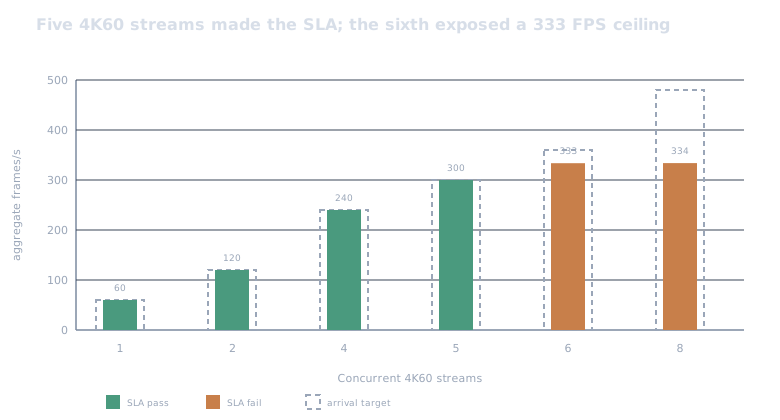
At five streams, median NVENC utilization was 82.6%, decoder utilization was 25.8%, SM utilization was 13.0%, and peak allocated VRAM was about 4.0 GiB. At six streams, NVENC rose to 93.2% while completed throughput stopped at 333.4 FPS. Eight streams pushed median NVENC utilization to 95.6% without raising throughput.
That pattern points to the encode side as the limiting resource for this particular light CUDA workload. The GPU cores were nowhere near full. A vision model, optical flow stage, multi-frame denoiser, or expensive color conversion could move the bottleneck back to CUDA long before NVENC reaches the same level.
The queue explained the seconds, not just the FPS
The failed runs were not mildly slower versions of the passing runs. They entered a different state.
With a measured saturation median of 333.6 FPS, six streams supplied roughly 26.4 more frames each second than the pipeline completed. Over ten seconds, that predicts about 264 unfinished frames, or 0.79 seconds of latency debt. The measured p99 was 0.78 seconds.
Eight streams supplied roughly 146 excess frames per second. The same simple model predicts 4.39 seconds of debt after ten seconds. Measured p99 was 4.24 seconds.
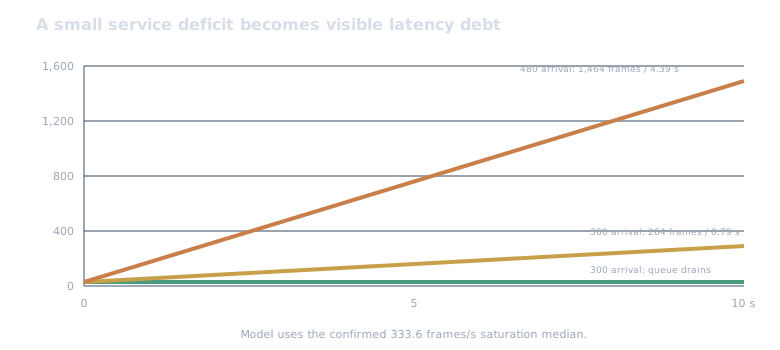
The close match is not a queueing-theory triumph. It is evidence that the failed cases were in sustained overload. Once arrival rate exceeds service rate, another percentile or a slightly faster wake-up cannot repair the system. Capacity, buffering, or workload has to change.
The host copy was expensive, but it was not the whole failure
The placement controls kept one 4K60 H.264 stream and the same hardware codec configuration:
| Placement | Effect | Achieved FPS | p99 latency | Miss rate | SLA passes |
|---|---|---|---|---|---|
| device | passthrough | 60.1 | 1.04 ms | 0.34% | 3/3 |
| device | pointwise | 60.1 | 1.00 ms | 0.34% | 3/3 |
| device | unsharp | 60.1 | 0.93 ms | 0.17% | 3/3 |
| device | four unsharp passes | 60.1 | 1.11 ms | 0.34% | 3/3 |
| host roundtrip | passthrough | 60.1 | 5.40 ms | 0.34% | 3/3 |
| host roundtrip | pointwise | 49.9 | 1,962.59 ms | 100% | 0/3 |
| host roundtrip | unsharp | 36.1 | 6,397.42 ms | 100% | 0/3 |
The transfer-only row is the important catch. Copying the 4K luma plane to host memory and back consumed roughly four extra milliseconds at p99, but it did not by itself break 60 FPS. The NumPy pointwise operation plus allocation and transfers crossed the service boundary. The unsharp operation widened the deficit.
So I would not summarize this as “PCIe copies always kill real-time video.” The measured lesson is more useful: a copy spends budget that downstream CPU work may need, and a device-resident pipeline leaves substantially more room for the actual application.
H.264, HEVC, and AV1 all cleared one stream
At one device-resident 4K60 stream, all three NVENC codecs passed:
| Codec | Achieved FPS | p99 latency | Mean NVENC use | Output rate | SLA passes |
|---|---|---|---|---|---|
| H.264 | 60.1 | 1.00 ms | 24.3% | 39.8 Mb/s | 3/3 |
| HEVC | 60.1 | 0.98 ms | 13.5% | 39.9 Mb/s | 3/3 |
| AV1 | 60.1 | 0.96 ms | 14.4% | 41.0 Mb/s | 3/3 |
Those numbers answer only whether this low-latency configuration met the schedule. The synthetic source, bitrate target, P1 preset, and ten-second duration make them unsuitable for a quality or compression-efficiency claim. A codec decision still needs perceptual quality, compatibility, decode cost at the receiver, and rate-control behavior on real content.
NVIDIA’s FFmpeg acceleration guide documents H.264, HEVC, and AV1 NVENC paths and recommends testing the exact binary and hardware configuration. The environment probe for this study did that before generating any result.
What I would deploy from this result
Five streams are the experimental maximum, not my production recommendation. It passed a ten-second synthetic clip three times, but median NVENC utilization was already above 82%. I would begin a service with four 4K60 feeds per GPU, then run a much longer soak with the real cameras and processing model before spending the remaining headroom.
I would also:
- keep NV12 or another encoder-compatible surface on the GPU from decode through processing and encode;
- treat color conversion, tensor layout, inference, overlays, and muxing as part of the same deadline rather than benchmark them separately;
- make queue depth, deadline misses, and drops production metrics alongside average FPS;
- test the actual GOP structure, bit depth, chroma format, scene complexity, and rate-control settings;
- set an explicit drop or degradation policy before overload happens; and
- separate codec-engine capacity from CUDA-core capacity, because the first saturated resource changes with the workload.
I did not include capture-card or network ingress, audio, mux latency, 10-bit or 4:2:2 video, B-frames, neural inference, multiple GPUs, energy per delivered frame, recovery after a drop, or a long thermal soak. The source lived on warm local storage. This was soft real time on a general-purpose Ubuntu kernel, not a hard-real-time certification.
The public companion in
ramwise-examples
contains the output-complete notebook, all 17 derived case medians with
replication ranges, and the machine-readable boundary summary. The notebook
runs without a GPU and includes a small queue-debt model readers can change.
The full harness and raw per-frame telemetry stay in the private lab. The signal-processing note, The Radio Won’t Wait for Your FFT, uses the same paced-queue method on I/Q samples.
The satisfying result is not that the GPU processed 4K video. The dedicated engines were built for that.
It is that the deadline exposed a crisp operating boundary. Five streams kept up. Six accumulated debt. And a trip through the CPU turned a sub-millisecond CUDA effect into a pipeline that could no longer finish the frame in time.
More on GPU The Radio Won't Wait for Your FFT →