The NVMe Specs That Actually Matter for a Homelab
Every NVMe drive is sold on one number: sequential read speed. Gen3 does ~3.5 GB/s, Gen4 ~7, Gen5 pushes past 12. The box shouts the big number, the reviews benchmark the big number, and for a homelab the big number is almost completely irrelevant.
I care about drives for one reason: they sit under a Proxmox host running a stack of VMs and containers. That workload looks nothing like the benchmark. So here’s what I actually check before buying, and the one spec that’s easy to get burned on because nobody prints it clearly.
Updated over time to keep the drive examples current; the DRAM-less caveat below is the part that hasn’t aged.
Sequential speed is the wrong benchmark
Booting an OS, launching an app, a VM doing its normal thing — almost none of that is a big sequential read. It’s a storm of small random reads and writes, and it’s bound by latency, not throughput. Which means the difference between Gen3 and Gen5 is, for this workload, basically imperceptible. I have Gen3 drives doing jobs where I’d never feel a Gen5 upgrade, because the bottleneck was never the interface.
If the marketing number doesn’t matter, two unmarketed ones do.
Spec one: TLC vs QLC
This is about the NAND itself, and it decides what happens when you actually push the drive.
Most consumer drives run a chunk of their fast flash as a pseudo-SLC cache. Writes land there at the advertised speed. It feels great — right up until the cache fills. On a TLC drive, the post-cache speed drops but stays usable. On a cheap QLC drive, it can fall off a cliff, down to a fraction of the rated number — I’ve seen sustained writes crater to 100–200 MB/s once the cache is exhausted. For a VM host that occasionally does something write-heavy (a backup, a big restore, a container image churn), that cliff is exactly when you’ll be watching a progress bar. Buy TLC. QLC is fine for a media pile that mostly sits still; it’s the wrong tool under a hypervisor.
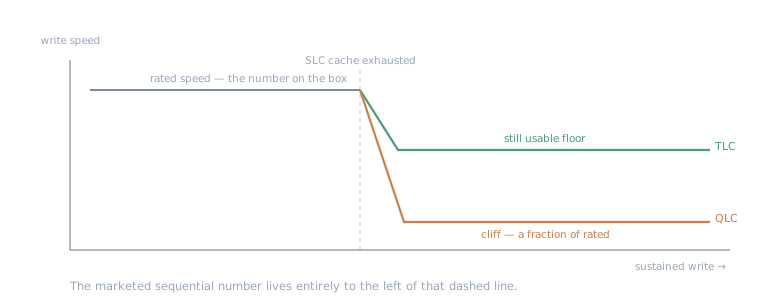
The rated number on the box describes only the cached region. After the cache fills, TLC steps down; cheap QLC falls off a cliff.
Spec two: DRAM vs DRAM-less
This is the one that actually bites, and the one the store won’t tell you cleanly.
A drive with onboard DRAM keeps its mapping table (the index of where everything physically lives) on a fast local chip. A DRAM-less drive doesn’t — it borrows a slice of your system RAM over the bus (HMB, Host Memory Buffer) to do the same job. For light single-user work you may never notice. Under concurrent random 4K — which is precisely what several VMs hammering a disk at once is — the DRAM-less drive’s random performance and latency consistency suffer, and they suffer worst under exactly the load a homelab generates.
So for VM storage on Proxmox, DRAM + TLC isn’t a nice-to-have. It’s the floor.
The trap: the spec table lies about DRAM
Here’s the part I want anyone building a box to hear, because it’s a genuinely easy mistake.
You cannot trust the retailer’s spec sheet on DRAM. The “Cache” field on parts-comparison sites is routinely blank, or wrong, or quietly conflating HMB with real DRAM. And several very popular, very fast-looking drives are DRAM-less — the Lexar NM790, the WD Blue SN580, the Samsung 990 EVO all lean on HMB. They post big sequential numbers and get recommended constantly, and someone building a VM host reads “fast NVMe, great reviews” and assumes DRAM that isn’t there.
The only reliable move is to identify the exact controller and NAND for the specific SKU you’re buying — Phison, Silicon Motion, Maxio, InnoGrit, whoever — and confirm the DRAM situation from a teardown or the controller’s own datasheet, not the store page. Manufacturers also swap components mid-life under the same model name, so “this model has DRAM” can stop being true on a later batch. Check the SKU in front of you, not the reputation of the name.
If it’s going near ZFS
One more, since a lot of homelab NVMe ends up touching ZFS. Don’t drop a consumer drive in as a SLOG and expect miracles. A SLOG wants low latency and, more importantly, power-loss protection — the capacitors that let the drive honor a sync write across a power cut. Consumer drives generally don’t have PLP, which makes them poor SLOG devices regardless of how fast they benchmark. L2ARC is more forgiving. But “fast NVMe” and “good ZFS log device” are different questions, and the spec that separates them (PLP) is, once again, not the one on the front of the box.
For the pool layout these drives end up in, see ZFS, BTRFS, and LVM in the Homelab.
Nothing here is exotic, and none of it is expensive to get right — it just isn’t the stuff the marketing points at. For a homelab drive: TLC not QLC, DRAM not DRAM-less, and verify that DRAM against the actual controller instead of the store’s spec field. Get those three right and the Gen number on the label can be whatever it wants.
Next in “Hardware the spec sheet lied about” I Built Cellular Routers Every Way. Then I Bought One. →