Deploying Fabric Without a Debugger
I set up my own Microsoft Fabric tenant to practice deploying like it mattered: three workspaces — dev, test, prod — a medallion pipeline over Microsoft’s AdventureWorks sample, and Azure DevOps wired up to push item definitions from Git into test and then prod. Portfolio work, not client work, which is exactly why I could afford to break it.
The solution itself is deliberately ordinary — six sample CSVs walked up through bronze, silver, and gold by three notebooks, with a data pipeline running them in order. Five Fabric items in total. That’s the thing being deployed; the rest of this post is about getting those five items into two more workspaces without lying to yourself about what moved.
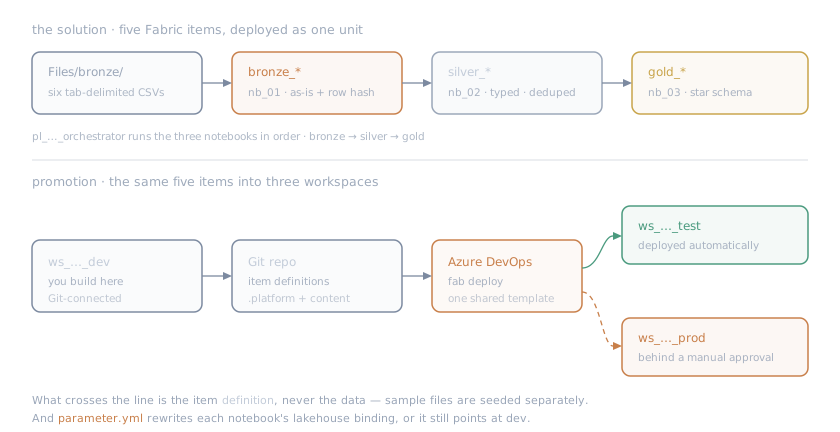
Five items, three workspaces. Definitions cross the line; data doesn’t.
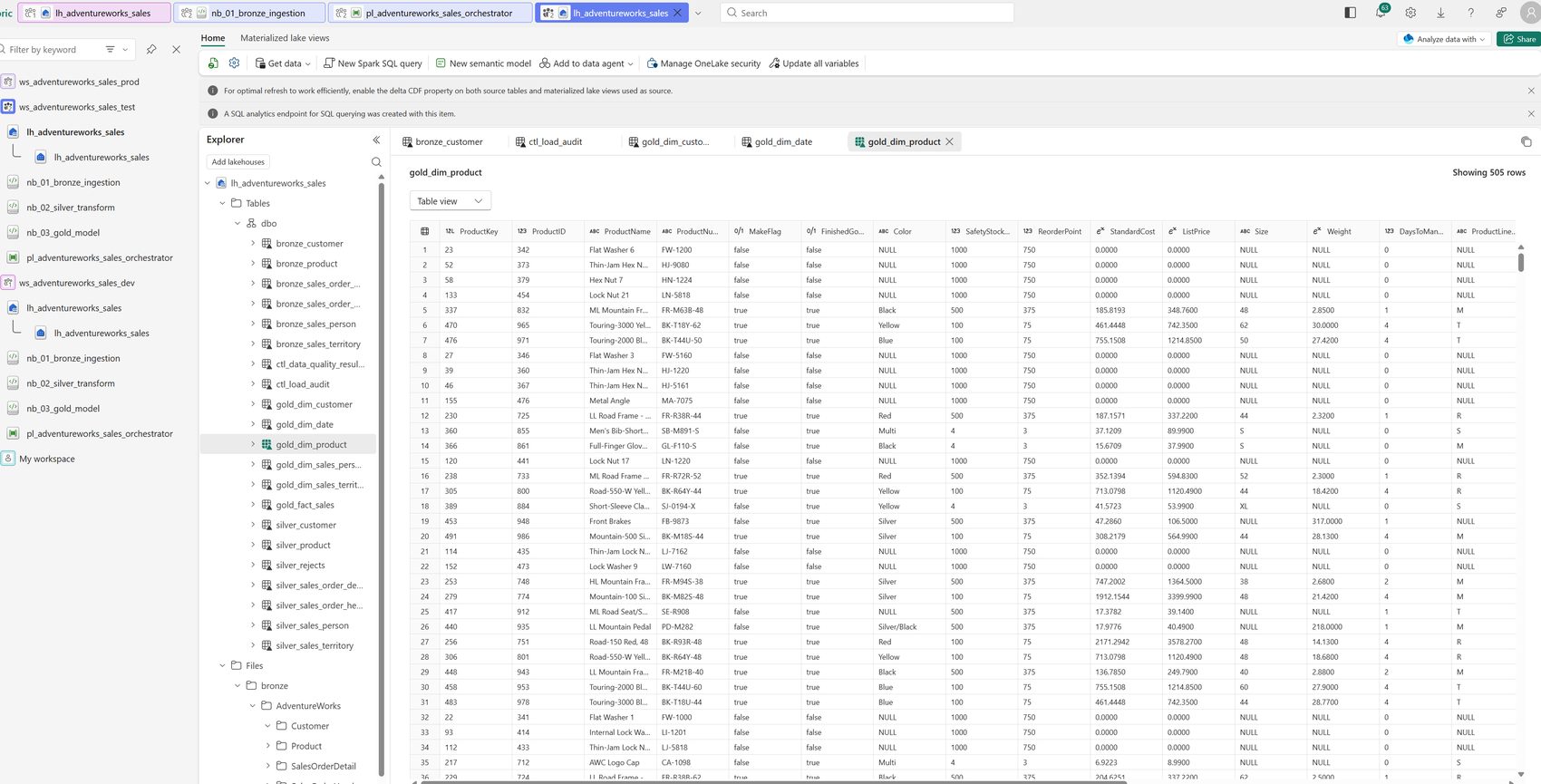
The first thing that actually went wrong did not announce itself. The deployment succeeded. Every item landed in the target workspace. And the notebook was still pointed at the lakehouse in the environment I’d deployed from.
A successful deployment kept the wrong binding
That’s the shape of the problem worth writing down. A Fabric item is not self-contained, and the binding isn’t held somewhere abstract — it’s sitting in the file Git carries. Open the notebook’s notebook-content.py and the dev lakehouse is right there in a metadata comment near the top:
# META "dependencies": {# META "lakehouse": {# META "default_lakehouse": "<dev lakehouse GUID>",# META "default_lakehouse_name": "lh_adventureworks_sales",# META "default_lakehouse_workspace_id": "<dev workspace GUID>",Deploying the definition copies that file, GUID and all. Nothing re-points it, and nothing in a green run mentions it. You get a test workspace running beautifully against dev’s data.
The fix is a parameter.yml entry that rewrites those lines on the way in — and the useful part is that you don’t hard-code the destination GUIDs either:
find_replace: - find_value: '\#\s*META\s+"default_lakehouse":\s*"([0-9a-fA-F]{8}-[0-9a-fA-F]{4}-[0-9a-fA-F]{4}-[0-9a-fA-F]{4}-[0-9a-fA-F]{12})"' replace_value: _ALL_: "$items.Lakehouse.lh_adventureworks_sales.$id" is_regex: "true" item_type: "Notebook"$items.Lakehouse.<name>.$id resolves to whatever that lakehouse’s ID happens to be in the workspace being deployed into, and $workspace.$id does the same for the workspace itself, so one rule covers test and prod. Two details worth stealing: capture group 1 has to isolate exactly the value you want replaced, and the pattern should include the surrounding context — match a bare GUID shape and you’ll cheerfully rewrite every GUID in the file.
Worth knowing before you go looking for it: what deploys is the item definition, not the data. Git and fabric-cicd carry the notebook, the pipeline, and the lakehouse object — not the files or table contents inside it. Seeding is a separate step, which is why the project keeps a small bootstrap script that pushes the sample CSVs into OneLake after a deploy.
This class of bug is invisible at deploy time and may surface only when someone asks why test and dev disagree—the same failure mode as a missing column that does not crash. The run is green and the result is wrong.
You cannot step through a pipeline
Here’s the constraint that ended up driving every other decision. When a deployment pipeline misbehaves, you have no debugger. No breakpoints, no stepping, no poking at a variable to see what it actually holds. You get a log, after the fact, from an agent that has already been destroyed. If you want another data point you change something, push, and wait a few minutes to see a different wall of text.
That makes diagnosis, not authoring, the expensive part — and it inverts how you should write the thing. A clever pipeline is cheap to write and miserable to debug. Every layer of indirection you add is a layer you’ll be reading through at 1 a.m. with no way to inspect it. So the goal stopped being “handle everything” and became small enough to diagnose from a log.
Concretely, that meant:
- The shared template knows nothing about the project. No item names, no business rules, no data seeding — it takes a service connection, a workspace ID, and a config path, and deploys. Everything project-specific lives in the thin caller. It’s the same reason to keep the runner dumb: a component that knows nothing can’t be wrong about anything, and there’s exactly one place to look when deployment itself breaks.
- Workspace GUIDs never enter Git.
config.ymlcarries a placeholder and the pipeline overrides it at runtime from an Azure DevOps variable group — which, confusingly, lives under a section called Library and is not Fabric’s Variable Library. Different layers: the variable group feeds the pipeline before anything is deployed; a Fabric Variable Library is an item inside a workspace that Fabric things read after they’re deployed. Either way, environment identity is a deployment-time input, not a committed fact. - The item folders are the inventory.
fabric-cicddeploys every supported item folder it finds under the configured directory. I deliberately did not keep a list of expected items, because a second source of truth is just a thing that drifts and then lies to you. - The deployer is not allowed to delete.
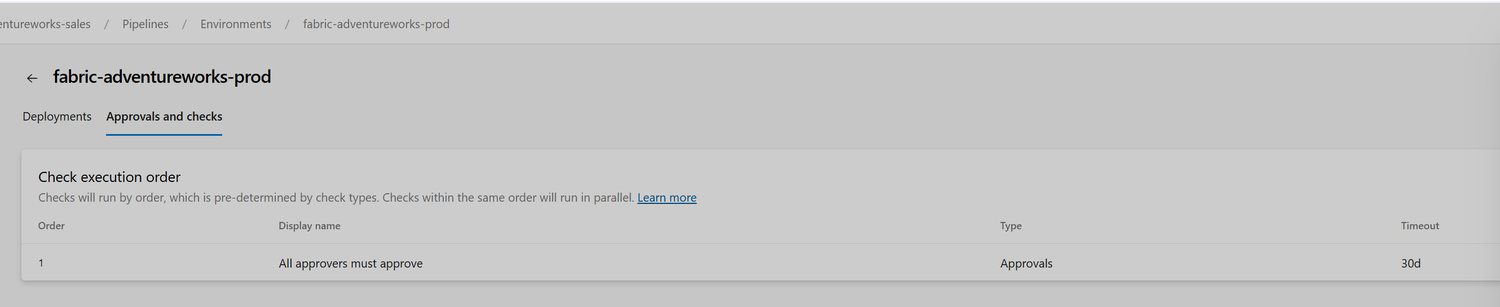
unpublish.skip: true, so an item missing from Git never removes anything from a live workspace. Deletion is a decision with an owner; it shouldn’t be a side effect of a checkout. That’s failing closed applied to deployment. - Prod is a deployment job with an approval. Not a flag in YAML — an Azure DevOps Environment, which is also where the deployment history lives. Test and prod are two stages of one pipeline rather than two pipelines you run by hand, so a release is one run tied to one commit, and prod can’t be started against a different branch by accident.
Three things the log will tell you, but not kindly
Every one of these cost me a cycle of push-and-wait, and none of the error messages point at the actual cause.
An error occurred with the encrypted cache. Fabric CLI wants somewhere encrypted to keep a session, and a Microsoft-hosted Linux agent has no usable credential vault to give it. The fix is one line — fab config set encryption_fallback_enabled true, documented as permitting “storing tokens in plain text if secure encryption is unavailable.” It’s defensible precisely because the agent is destroyed minutes later, and it’s also the one CLI setting that doesn’t persist across sessions, so it has to be set inside the job anyway. On a persistent self-hosted agent I’d think about it again.
Deployment jobs don’t check out your repository. Ordinary jobs do it for you, so you learn to assume it. Microsoft is blunt about the difference — a deployment job “doesn’t automatically clone the source repo” — but the failure surfaces later as a missing config file rather than as “there is no source here.” An explicit checkout: self in the shared template makes it work in both kinds of job, which matters more once every stage is a deployment job.
Keep service connection and environment names literal. Both are protected resources, authorized around the run rather than during it, and Microsoft is explicit for environments: runtime parameters “are expanded only at run time”, so one referenced that way fails with The environment does not exist or has not been authorized for use — an error about permissions for a problem about timing. That’s the one that felt least like my fault and taught me the most: a pipeline has phases, and a value that exists in one may not exist yet in another.
What the project adds
Almost none of the machinery. fabric-cicd and the Fabric CLI are both Microsoft’s, and they do the real work of publishing definitions. What I ended up with is wiring — one template, one release pipeline that promotes test to prod, a config layout that survives three environments — and the only claim I’d make for it is that it stopped surprising me. I pinned the CLI version, deleted the parts I couldn’t explain, and left parameter.yml empty until something forced an entry into it.
That’s a lower bar than “best practice,” and I think it’s the more useful one for a thing you’ll meet again at 1 a.m. The tutorial gets you a green run; what you want on day two is a pipeline boring enough that the log is enough.
Sources & further reading
The two tools doing the actual work:
fabric-cicd— Microsoft’s deployment library. The parameterization guide coversfind_replace, the regex rules, the_ALL_environment key, and the$items/$workspacedynamic variables; config deployment coversconfig.yml.- Fabric CLI —
fab authfor the federated login, and settings forencryption_fallback_enabled.
Fabric side:
- Git integration — how item definitions get into the repo in the first place.
- Variable libraries — a Fabric item holding per-environment values with a value-set per stage. I didn’t use one here, but where it’s supported it’s the Fabric-native alternative to
parameter.ymlrebinding. (Again: not the Azure DevOps variable group above.) - Developer tenant settings — where “service principals can call Fabric public APIs” lives, and workspace roles for what the deploying identity needs.
Azure DevOps side:
- Deployment jobs — including the no-automatic-checkout behaviour.
- Environments and approvals and checks — where the prod gate actually lives.
- Workload identity federation — federated tokens instead of a stored secret.
The scrubbed starter — reusable template, a two-stage release pipeline, and a setup guide — is in ramwise-examples/fabric-cicd-template.
Next in “Real data on small machines” DuckLake on One Machine →