The Data Was Already in the Browser
There is a small ritual I have repeated often enough that it should have become a tool years ago.
Open Chrome DevTools. Find the useful fetch or XMLHttpRequest call. Copy the response. Paste it into a JSON viewer. Find the array inside the object. Copy three more pages of the same endpoint into a scratch script. Flatten a few fields, infer a shape, and finally load the result somewhere I can ask it a question.
The application already had the data. The browser had already received it. I was rebuilding a disposable data pipeline around it every time.
So I built WireData, a Chrome extension that turns JSON application traffic and page tables into local, queryable datasets. It can discover record collections inside a response, combine repeated or paginated captures, generate TypeScript and JSON Schema, and register the result with DuckDB-WASM for SQL in the browser.
Capture was the obvious feature. It was not the hard part.
The hard part was deciding when browser traffic becomes a dataset: who granted access, which representation is authoritative, how a row points back to its source, and what “local” still does not make safe. Those boundaries became the product.
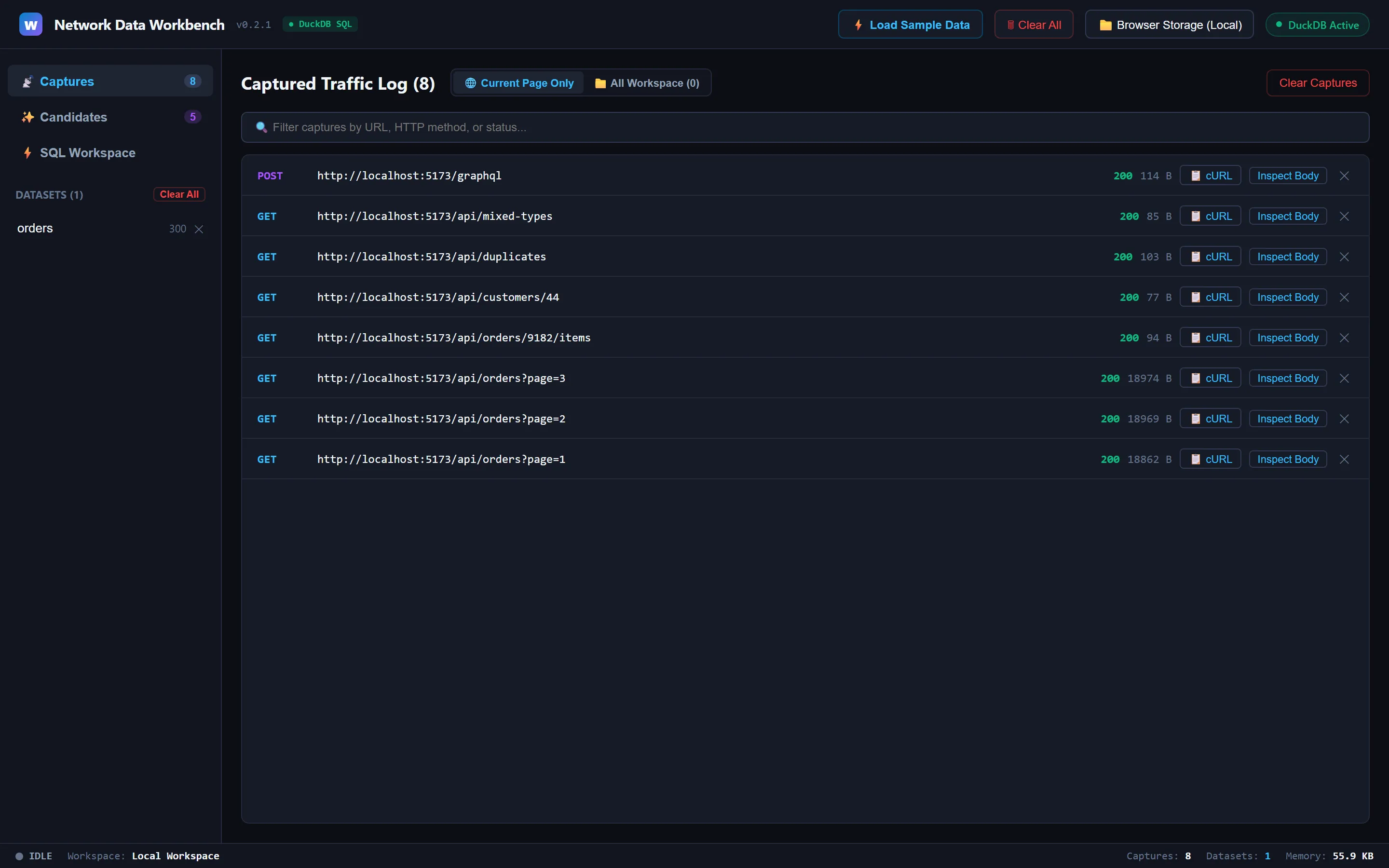
The traffic log is the hand-off point: browser responses become named captures before any dataset or query exists.
Permission had to be part of the interaction
The blunt extension design is to request access to every site at install time. That makes the implementation easy and the trust story terrible. WireData instead declares HTTP and HTTPS as optional_host_permissions and asks for one origin when the user presses Start Capture or Scrape Table.
Chrome explicitly supports this model: optional host permissions are granted by the user at runtime, and programmatic injection requires permission for the target page. The manifest can describe the extension’s possible reach without granting that reach up front.
That decision reaches deeper into the code than a permission dialog. Chrome requires a live user gesture for the request, so the permission call has to happen before the click handler wanders through other asynchronous work. WireData precomputes whether the active origin is already allowed. If it is not, chrome.permissions.request() is the first awaited operation after the click.
Only after the grant does WireData create the capture session and inject its hooks. The result is a more honest state machine:
idle → user selects Start Capture → origin permission granted → hooks installed in this tab → capture active → user stops capture → hooks removedIf permission is denied or injection fails, the UI must remain idle. Reporting “capturing” because a button changed colour would be worse than an ordinary error: it would create a false record of what had been observed.
The capture path crosses three browser worlds
A normal Chrome content script runs in an isolated JavaScript world. That isolation is useful, but it also means replacing window.fetch there does not replace the page’s window.fetch. Chrome’s documentation is explicit that the page and content-script worlds cannot see each other’s JavaScript variables.
WireData therefore installs a small, reversible hook in the page’s MAIN world. The hook wraps fetch and XMLHttpRequest, clones JSON responses, and posts the captured response text into the page. An isolated bridge receives that message and passes it to the Manifest V3 service worker, which routes it to the side panel or workbench.
page MAIN world fetch / XMLHttpRequest hooks ↓ window.postMessageextension isolated world bridge ↓ chrome.runtime.sendMessageManifest V3 service worker ↓side panel and workbenchThe injected function must be self-contained because Chrome serializes a copy into the target page. It also keeps references to the native functions so Stop Capture can restore them. Capture is a temporary intervention, not a permanent mutation of the tab.
This path has a deliberate visibility boundary. Page-mode capture sees JSON responses from fetch and XMLHttpRequest after capture begins. It skips non-JSON responses, requests that happened earlier, browser-internal pages, and response bodies above the current 25 MiB ceiling. It is not a packet sniffer, a historical network recorder, or a way around authorization.
Parsed JSON was the wrong thing to preserve
My first storage design made a subtle promise it did not keep.
I parsed each response, used the JavaScript object for collection detection, then serialized that object when saving it. The saved data was semantically similar to the response, but it was no longer the representation I had hashed. Whitespace disappeared. Numeric formatting changed. Key order could change. A content-addressed object whose filename describes different content is not content-addressed storage; it is a mislabeled cache.
WireData now treats the captured response text string as canonical. It computes a SHA-256 hash from that string and writes the same string under objects/<hash>.json. Parsed objects exist for inference and display, but they do not get to replace the stored source.
The narrower wording matters here. This preserves the exact response text WireData captured, not compressed network frames or transport-level bytes. The invariant is still useful and testable:
sha256(utf8(read(objects/<hash>.json))) == <hash>That one rule buys several properties. Identical response texts share an object. Dataset definitions can point to immutable source content. A row can carry the response hash and JSON Pointer that produced it. Derived views can be rebuilt without pretending that a normalized object was the original observation.
A dataset needs lineage, not just rows
An API rarely hands over a table called orders. It hands over an object with pagination metadata, nested arrays, optional fields, and links to other objects. WireData searches a captured JSON document for repeated record collections and records each collection’s RFC 6901 JSON Pointer.
Repeated captures then need a stable grouping key. URLs such as /api/orders/9182/items and /api/orders/1044/items are normalized into a route pattern, while GraphQL operation names can distinguish calls that share one endpoint. A dataset definition records the source route, collection pointer, flattening policy, visible columns, type decisions, and deduplication policy.
The deduplication choice is explicit: keep every row, keep the earliest instance of an identity, or keep the latest. There is no universally correct default hiding behind the interface. Paginated pages normally want keep_all; repeated snapshots may want keep_latest; event-like traffic may lose information under either deduplicating policy.
Each extracted row keeps capture time, request URL, response hash, record pointer, and field-level source pointers. That is what turns “I copied some JSON from a tab” into a dataset I can inspect later. The table is useful because it has not severed itself from the traffic that produced it.
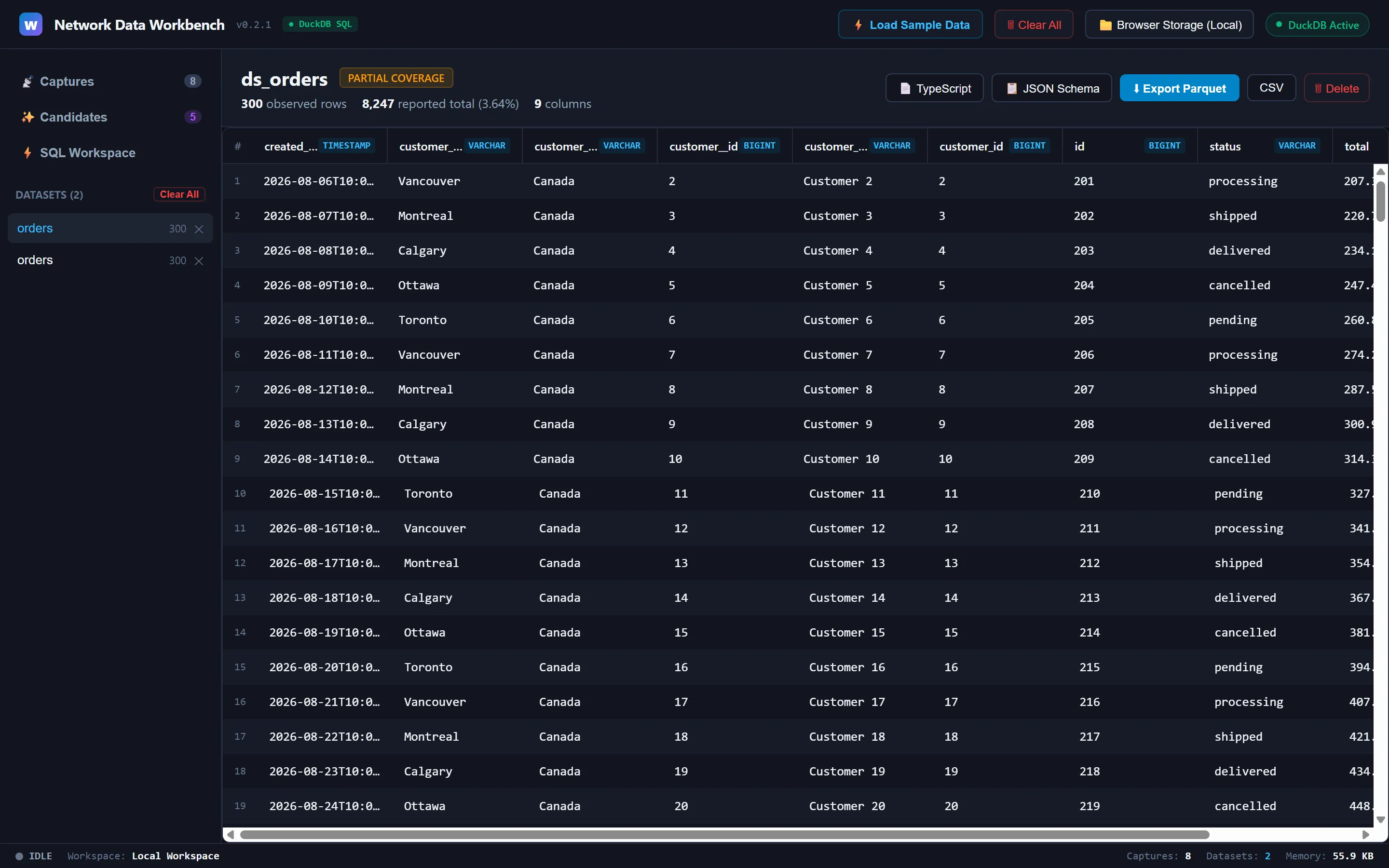
Coverage, types, and exports stay attached to the dataset definition instead of disappearing into a one-off copy.
DuckDB belongs beside the data
Once the rows exist, sending them to a hosted query service would undo the local boundary. WireData instead bundles the MVP DuckDB-WASM module and its worker inside the extension.
DuckDB describes its WebAssembly client as a full engine compiled for the browser; queries execute client-side without a server round trip. It also documents self-hosted module and worker files for offline and strict-content-security-policy deployments. That matches Manifest V3’s extension-page policy, which restricts script sources and does not permit adding arbitrary remote script origins to the extension’s CSP.
WireData registers a dataset snapshot as a real DuckDB table. Declared logical types become TRY_CAST expressions, so one anomalous value becomes NULL in the SQL view instead of taking down the entire registration. A second relation holds provenance fields. Queries are serialized through one connection because overlapping registrations against the same WASM connection caused runtime corruption during development.
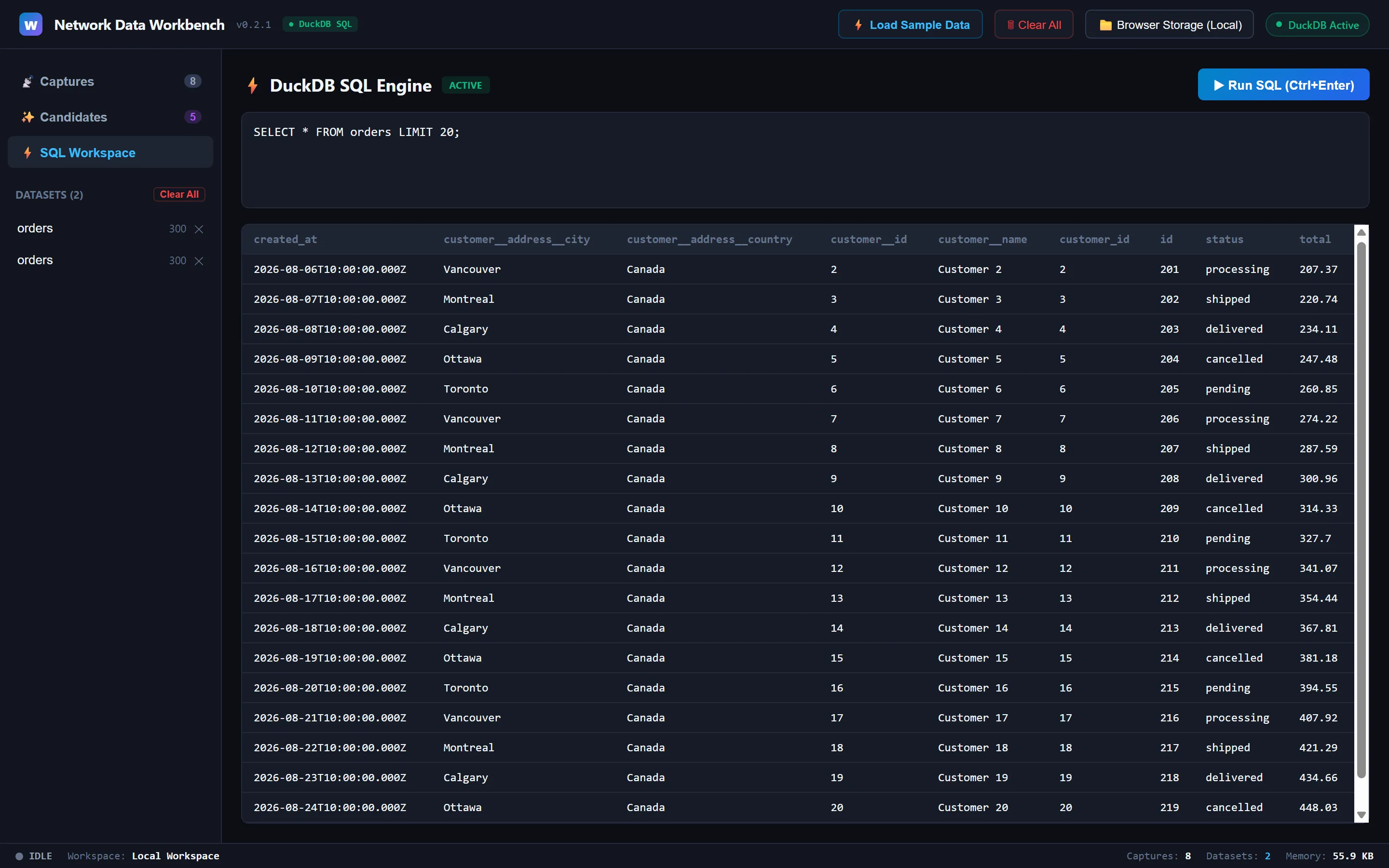
The query runs against a locally registered dataset; no hosted query service is in the path.
There used to be a fallback SQL parser. It understood a friendly subset of SELECT, which made the interface appear resilient while returning answers from a different and much smaller language whenever DuckDB failed. That fallback is gone. If DuckDB cannot initialize, SQL is unavailable and the interface says so. A visible missing engine is safer than a successful-looking wrong query.
DuckDB-WASM also gives the product a real limit. Its browser client has finite memory and uses a single thread by default. WireData is a workbench for captured application data, not a claim that every warehouse workload belongs inside a Chrome tab.
Local-first moves the security boundary; it does not erase it
WireData has no cloud backend, account, or telemetry path for captured data. Its storage and analysis stay in the browser or a user-selected local workspace. That is materially different from pasting a production response into an online formatter.
It does not make captured data harmless.
Response bodies can contain names, identifiers, internal records, or secrets. A local copy still needs appropriate authorization, retention, and deletion. Page-mode capture deliberately avoids collecting request headers and request bodies, and sanitizes sensitive-looking URL parameters before persistence, but the response content remains useful precisely because WireData does not blindly redact fields out of the source object.
Exports create another boundary. The CSV serializer prefixes cells beginning with the common spreadsheet formula triggers =, +, -, and @, then applies normal CSV quoting. That is a useful guard, not a universal sanitization claim. JSON, JSONL, Parquet, generated interfaces, and generated schemas each preserve different parts of the dataset and should be handled according to the data inside them.
This is one answer to the gap I described in The Missing Middle in Data Tooling: a small local tool that handles file-sized work without a platform behind it.
The useful boundary
WireData is for the moment when a developer, QA analyst, or data engineer is authorized to inspect a running web application and needs more than a single response body. It replaces the repeated glue between DevTools and the first real query:
capture → discover → define → query → trace → exportKeep using DevTools when one request is enough. Use a purpose-built API client when the contract itself is the object of study. Use a crawler or ingestion service when collection must be scheduled, remote, or durable across many sites. Move the work to a native database when the data is larger than a browser should own.
The browser did not need another JSON viewer. It needed a way to admit that the data passing through it was already close to a dataset—and then add the consent, identity, provenance, and query engine that make that statement honest.
WireData is available in the Chrome Web Store. The source repository, reviewer demo, and privacy policy are public.
Version boundary: as of August 29, 2026, the Chrome Web Store lists version 0.1.7, updated August 27. The repository reviewed for this article identifies itself as development version 0.2.1. Implementation details introduced after 0.1.7 may not yet be present in the store build.
More on Product architecture The Missing Middle in Data Tooling →